


VIDEOStoll’s advice is good, but not practical. I have one toothbrush, I have many passwords for many sites. What I need is an obscure munged password for each site I use and a memory capable of remembering which random alphanumeric sequence goes with which site. It’s not going to happen so instead I started using algorithms. My password would be Tp4tSi!? That’s T he p assword for (4 ) t his S ite i s, with a ! to add security and I’d replace the ? with the first letter of the domain name. So for AoB Blog my password is Tp4tSi!a . Now I don’t need to remember what my password for Facebook is, I can work out from the browser bar that it is Tp4tSi!f .
Actually it’s a bit more complicated than that, but you get the idea. And this worked well enough till a site where I was using the algorithm was cracked. Now I needed a new password – which needs a new algorithm. So now I have to remember, is this a site using the new password system or the old one? Or a unique password? And how to you remember the right way to munge your a!g0rithm?
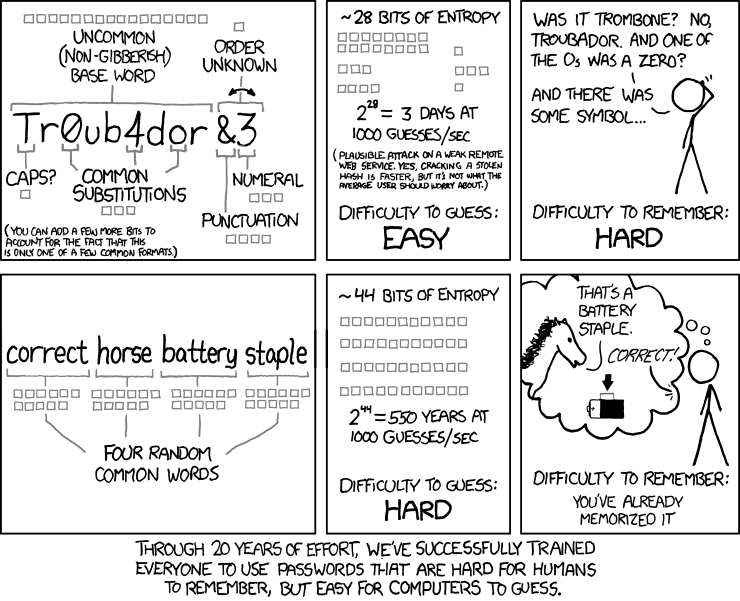
Password Strength by Randall Munroe, xkcd.
I like the passphrase idea, but again I’d need one for each site. It makes password management a battle between my memory and a computer’s speed. I have a poor memory so I’ve finally converted to using LastPass . This is a program that bolts on to your browser. When you type in a password, it remembers the password, user name and site you were on. It can now autofill that password for you. The clever bit is that LastPass can also generate passwords, so you can have randomised alphanumeric sequences without having to remember them.
http://www.youtube.com/watch?v=AXwdzWaf4RI
In this case I can now have automatically generated 12 character passwords for each site. But is this really secure? What if LastPass decide to turn evil, won’t they have lots of valuable passwords on their site? As it happens no, LastPass doesn’t store your passwords. What it does is like Wuala , it uses your master password to encrypt the other passwords. What gets stored online is the encrypted password. Software on your computer handles the encryption and decryption with the master password. That does mean you need a secure master password, but this is where a passphrase works – if it’s a secure one .
LastPass itself is free and works with more or less any browser you could want. There is a catch. This is free access via a laptop / desktop device. If you want to use a phone or tablet you’ll find the mobile app more useful and this for iOS, Android, Blackberry etc, needs a premium account to work. This is just $12 a year, so that’s not a terrible fee. Also paying money can give you a bit more confidence that the site won’t be folding shortly. If it did you could recover all the impossible to remember passwords with the “email me my password” function on most sites, but it’d be a pain to work through.
You can try LastPass for yourself at lastpass.com . It won’t prevent servers being hacked and a password being compromised, but when that does happen it’ll be that one site won’t be a key that opens all your other sites.
…and as for breaking into your account? If your password isn’t one of the ones below then you’re a bit more secure than most people.
Images
Password Strength by Randall Munroe / xkcd . [cc]by-nc[/cc]
500 Worst Passwords by Kate Bingaman-Burt / Mark Burnett .